Vesper is a web browser for Windows. It is built to stay calm with many tabs open: tabs you are not using rest and stop using memory, ads and trackers are blocked before they load, and AI features stay off until you turn them on. The Windows beta is free.
The web is loud.
Everything wants you, all at once: tabs, alerts, pop-ups, autoplay, and the trackers you never see.
Let the day go quiet.
Close nothing. Keep your calm.
Vesper is the calm browser for Windows.
Open as many tabs as you like. The ones you are not using rest, ads and trackers never load, and AI stays off until you ask.
- 150 tabs on a quarter of the memoryour test ↓
- Free beta for Windows 11
Four turns.
Tabs that rest.
Open everything. Tabs you are not looking at rest; they come back, where you left them, when you return.
Ads that never load.
Requests to known ad and tracker servers are never made. Pages get lighter and fewer companies see your visit.
AI that asks first.
The assistant is off until you turn it on. Agents connect only when you approve them, as read-only or with control, and one Stop revokes them all.
Your search. Your choice.
No default is picked for you. Choose any engine on first run and change it whenever you like.
150 open. 12 awake. 0 trackers. 1 in focus.
Tide keeps at most 12 pages awake when memory is tight (development build, measured on 150 real websites). This page loads no trackers and no analytics.
Behind every tab is something you meant to come back to.
Vesper keeps it. Quietly.
07 Prove it · benchmark of 5 October 2026
150 tabs on a quarter of the memory.
We opened the same 150 public websites, one per tab, every 3 seconds, in each browser on its own with a fresh profile. A browser stopped opening tabs when the PC had less than 5 % of its memory free.
0
Vesper150 of 150 tabs
4,394 MB
Vesper · 150 tabs · 4,394 MB · 39 processes
Browser A150 of 150 tabs
18,409 MB
Browser A · 150 tabs · 18,409 MB · 188 processes
Browser Bstopped at 88 tabs
20,405 MB
Browser B · 88 tabs · 20,405 MB · 262 processes
Browser Cstopped at 88 tabs
20,254 MB
Browser C · 88 tabs · 20,254 MB · 229 processes
Browser Dstopped at 46 tabs
24,012 MB
Browser D · 46 tabs · 24,012 MB · 196 processes
The race replays the measured result: tab counts and final memory are measured; the steps in between are drawn evenly.
150/ 150
tabs open in every round. Two other browsers stopped near 88 and one near 46, already holding 20 to 24 GB.
4.2×
less memory than the only other browser that kept all 150 tabs open: 4,394 MB against 18,409 MB.
39
processes for 150 tabs. The other browsers ran between 188 and 262.
How it was measured. One browser at a time, a new temporary profile and default settings (one browser as a guest without sync). The same 150 public sites in the same order, with no sign-in and no interaction. Three rounds in alternating order; each number is the median. Vesper development build on CEF 154; four widely used browsers in their current public versions on the test date, named here as Browser A to D.
Limits. One Windows PC (Intel Core, 31.8 GB of memory), one date, these 150 sites. Vesper was a development build, not a release. Page load speed was not measured. With the browsers idle, Browsers B and C used less CPU time than Vesper, with about 60 fewer tabs open.
All the numbers
| Browser | Tabs open | Memory, MB | Peak memory, MB | Idle CPU, s (min 1–7) | Processes |
|---|---|---|---|---|---|
| Vesper (development build) | 150 | 4,394 | 6,868 | 167.5 | 39 |
| Browser A | 150 | 18,409 | 18,653 | 236.8 | 188 |
| Browser B | 88 | 20,405 | 21,454 | 132.5 | 262 |
| Browser C | 88 | 20,254 | 21,456 | 138.8 | 229 |
| Browser D | 46 | 24,012 | 27,950 | 600.0 | 196 |
08 See it
This is Vesper.
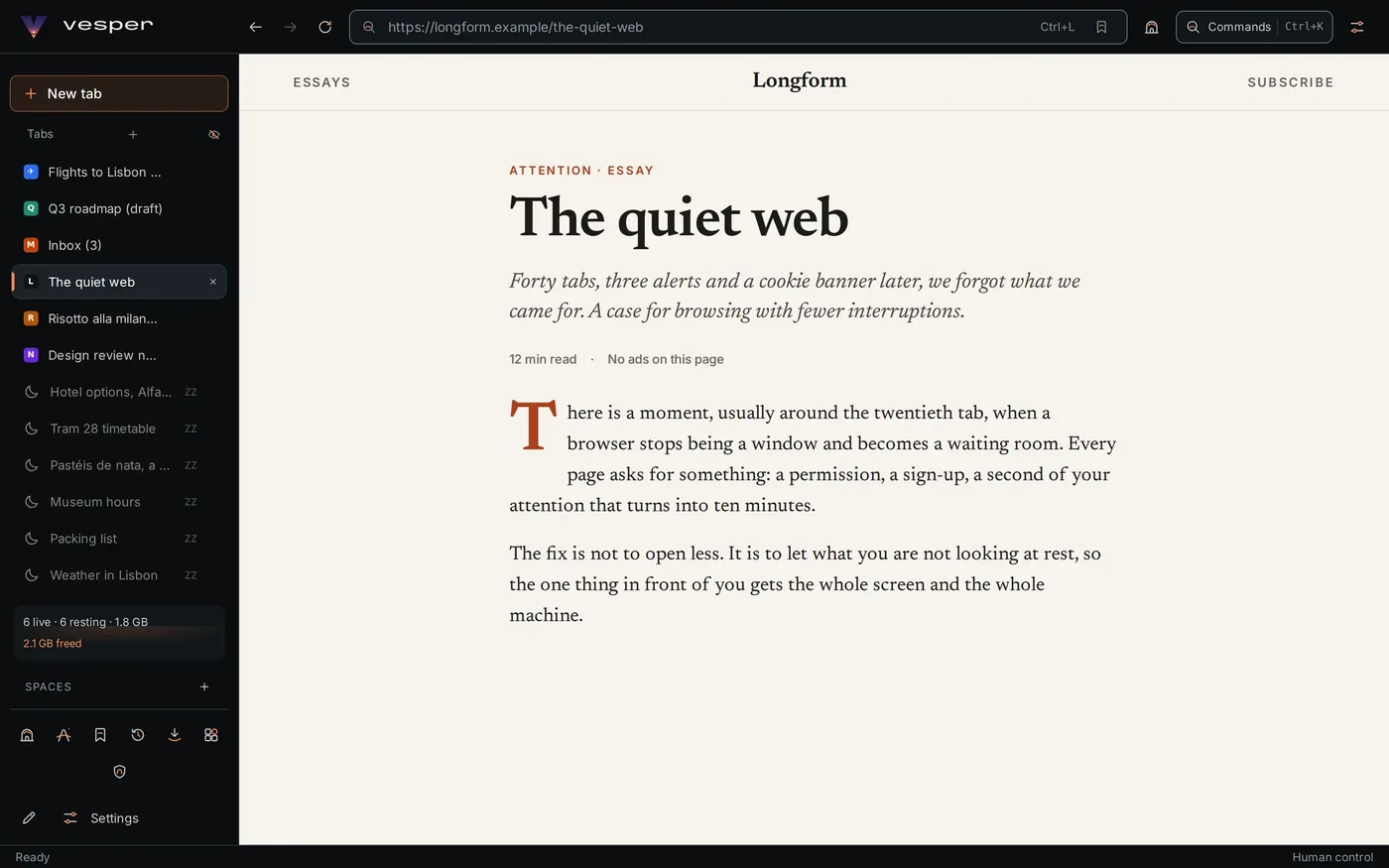
Tabs down the side, one page in front of you, everything else resting quietly.
Open everything. Only what you use stays awake.
Tabs you have not looked at in a while rest. They keep their place in the list, marked with a moon, and come back where you left them. The meter at the bottom shows what is awake and how much memory resting freed. A page with text you have typed, audio playing or a question waiting for you is never put to rest.
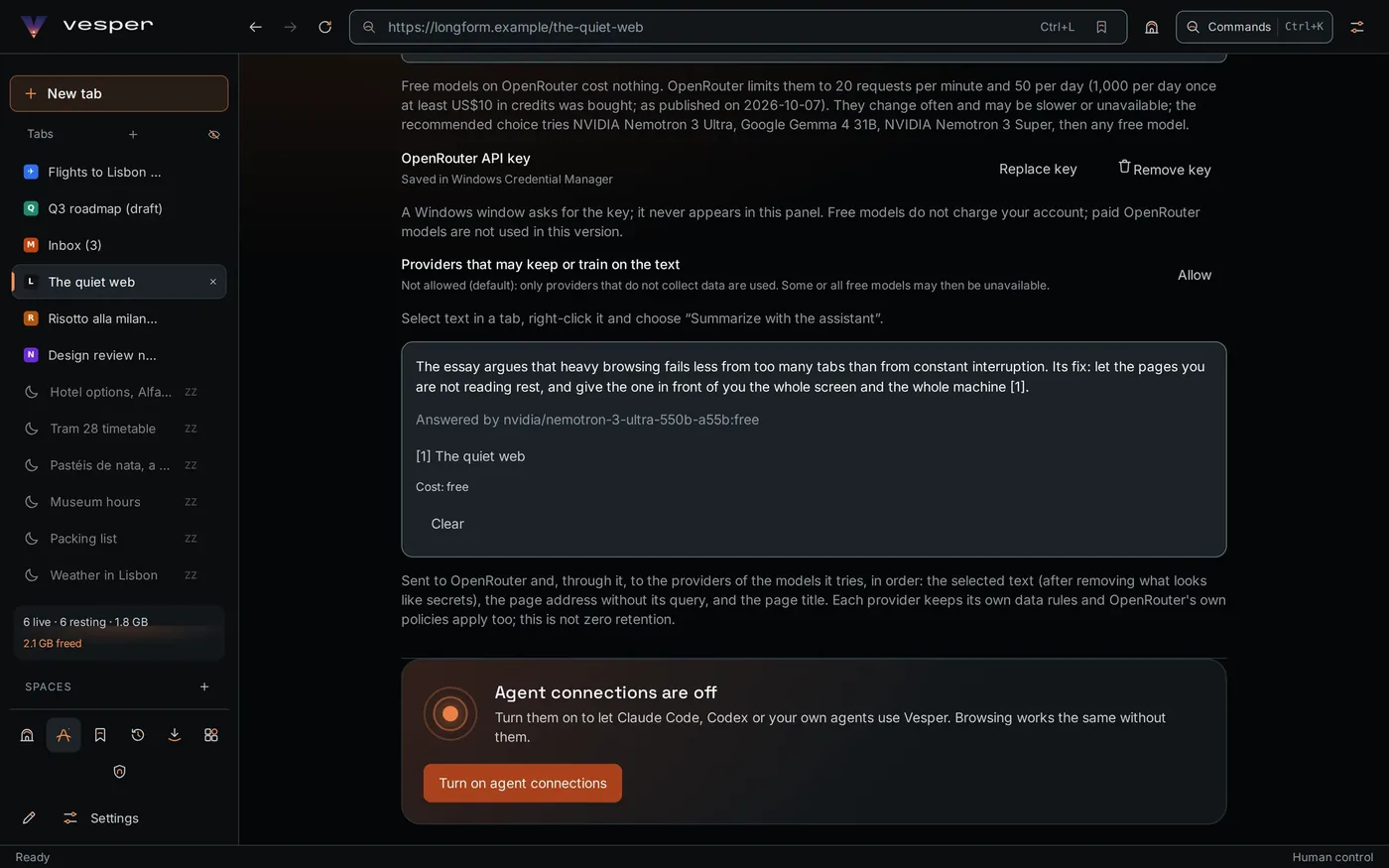
Select text, right-click, summarize.
The answer cites its source, names the model that wrote it and shows what it cost. The best free models on OpenRouter are the default; your own OpenAI key works too. The key is kept by Windows and never appears in the window.
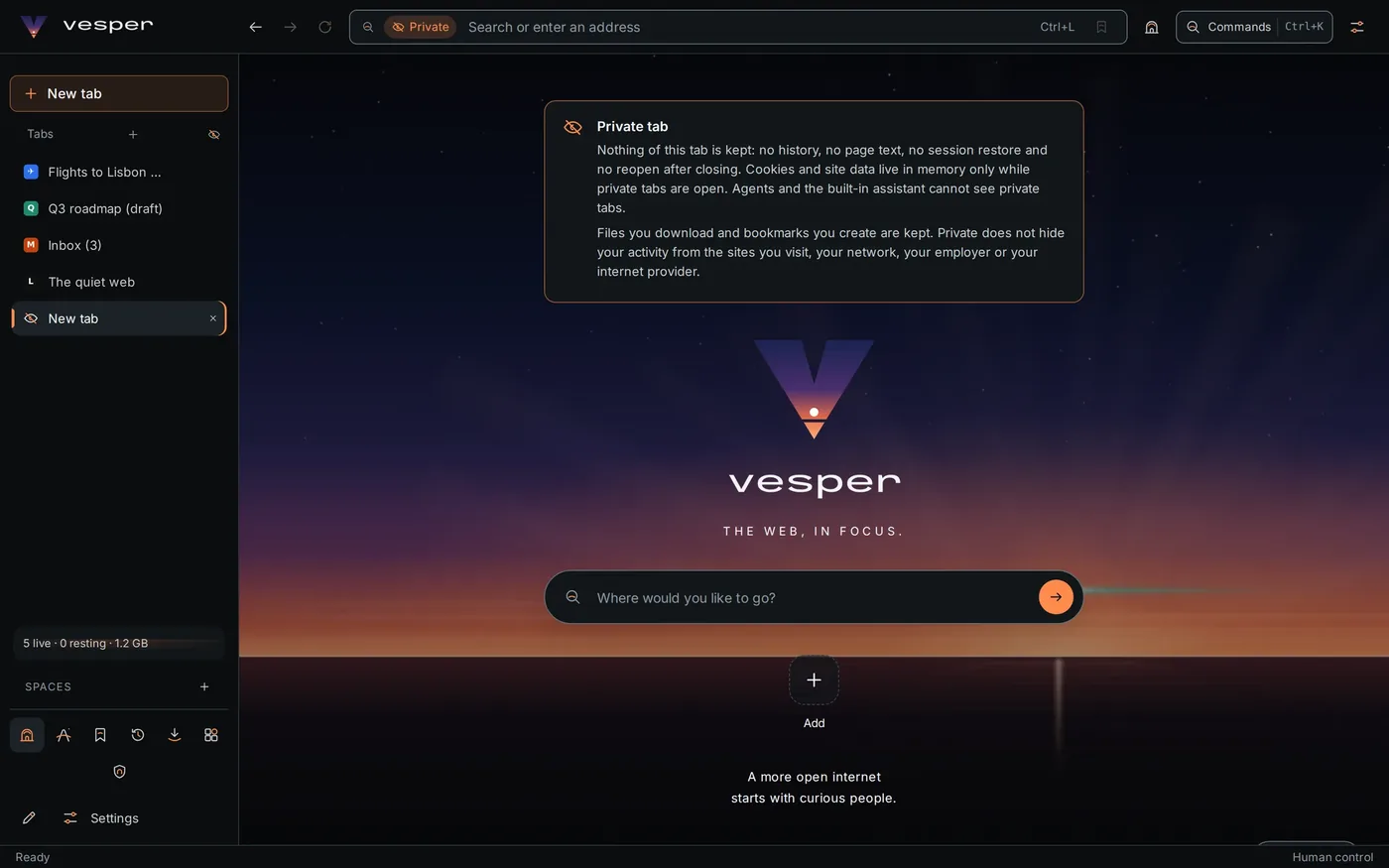
Private means nothing is kept.
No history, no page text, no session restore and no reopen after closing. Cookies live in memory only while private tabs are open, and agents and the assistant cannot see them. The notice also says what private cannot do: it does not hide you from the sites you visit or your network.
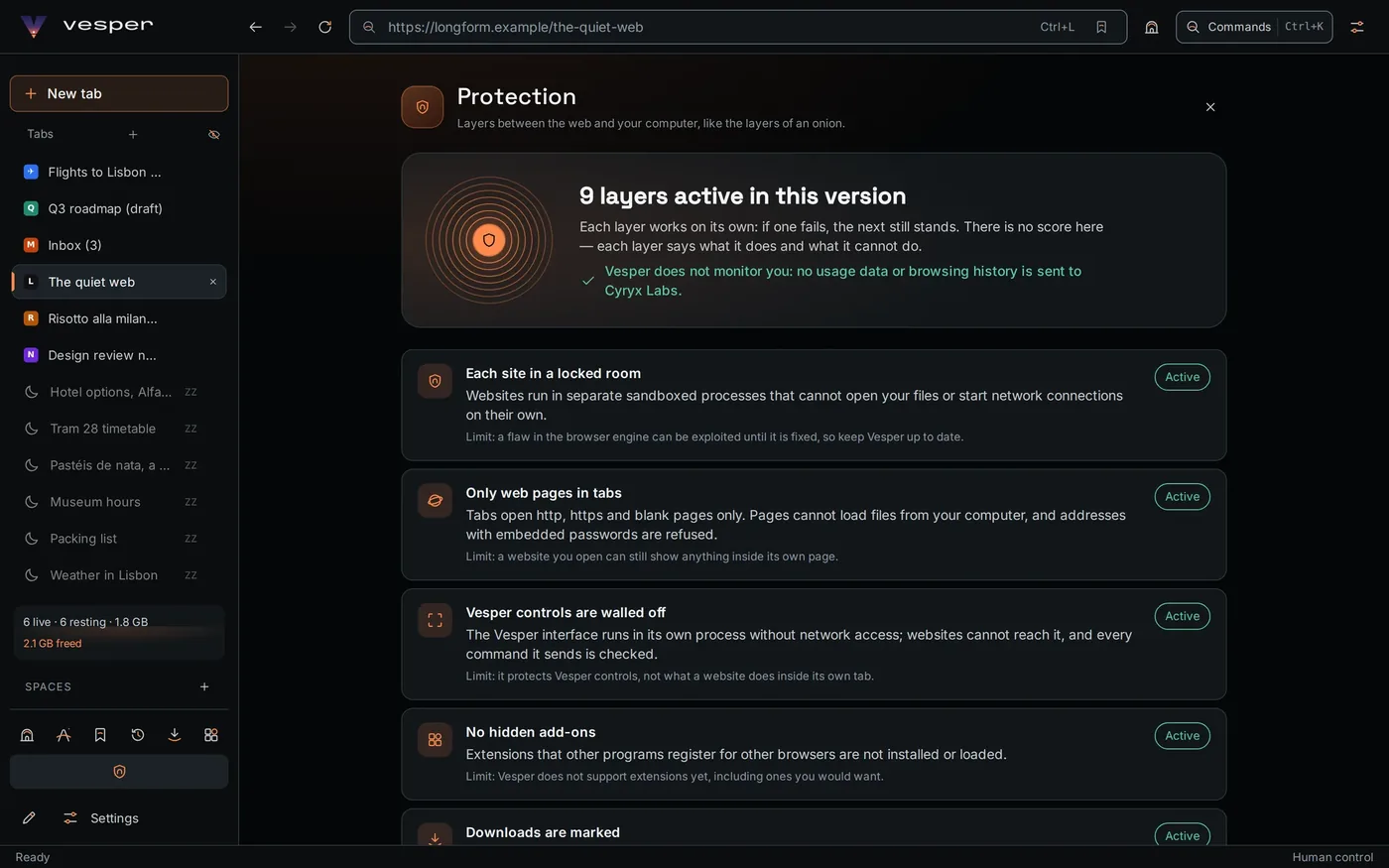
Every safeguard says what it cannot do.
Nine layers, each explained in plain words with its limit next to it. There is no score to chase. Vesper sends no usage data and no browsing history to Cyryx Labs.
The interface is real; the websites shown are samples made for these screens.
09 Trust it · AI and your data
AI when you ask. Nothing when you don't.
The assistant
Off until you turn it on. Browsing works the same without it.
- It reads what you selectThe selected text, the page address without its query and the page title. Anything that looks like a secret is removed first.
- Free models by defaultThe best free models on OpenRouter, tried in order, or your own OpenAI key. You can refuse providers that keep or train on text.
- Your key stays with WindowsSaved in Windows Credential Manager. It never appears in Vesper's window or in a web page.
- Costs before surprisesEach answer shows its cost. Limits per task, per day and in total stop spending before it happens.
- Agents only with your approvalClaude Code, Codex or your own agents connect only when you turn connections on and approve each one, as read-only or with control. They work in your tabs, never in private ones, and one Stop revokes them all.
Text you send goes to the provider you chose and follows its rules. That is not zero retention.
What stays yours
Vesper is built to work without sending your browsing anywhere.
- No usage data to Cyryx LabsVesper sends us no usage data and no browsing history.
- Your history, searched on your computerFind a page you saw, and if you turn it on, by words that were on it. The search runs locally.
10 And the rest
Everything you expect from a browser.
Find in pageCtrl+FCounts every match as you type.
Page zoomCtrl +The percentage shows next to the address.
CommandsCtrl+KEvery action, one search away.
Private tabCtrl+Shift+NNext to your other tabs, kept apart.
Tabs on the side or on topSwitch the layout whenever you like.
SpacesKeep work, home and travel tabs apart.
Bookmarks, history, downloadsAll in one side panel.
Bring your bookmarksFrom the browser you use today, with a preview first.
Save as PDFAny page, in one step.
Themes and wallpapersDark, light, presets and wallpapers.
Quick apps on HomeYour most used sites, one click away.
Three languagesEnglish, Português and Español.
The web, in focus.
Free beta for Windows 11
Be first on the Vesper beta.
Email us and we will send you Vesper as soon as the public beta opens. No account, no newsletter, no tracking.
Email us for the beta
contact@vesper-ai.us
- Email usOne line is enough. The button above writes it for you.
- Get the betaWe send you the Windows build the day the public beta opens.
- Install and goRun the installer on Windows 11. No account to create.
Windows 11, 64-bit · Free during the beta · Android in development · macOS and Linux later
Questions
What people ask about Vesper.
Straight answers, limits included. Pick a topic or type what you want to know.
Yes. The Vesper beta for Windows is free. Vesper shows no ads of its own and collects no usage data or browsing history.
In our test on 5 October 2026, Vesper kept 150 tabs open in 4,394 MB. The only other browser that reached 150 tabs needed 18,409 MB; two others stopped at 88 tabs with about 20 GB, and one at 46 tabs with 24 GB. It was one Windows PC and a Vesper development build; the method, the limits and every number are in the benchmark on this page.
A feature called Tide lets tabs you have not looked at in a while rest. They keep their place in the tab list and come back where you left them. When memory is tight, at most 12 pages stay awake. A page with text you have typed, audio playing or a question waiting for you is never put to rest.
Yes. Blocking is built into Vesper: requests to known ad and tracker servers are never made, so their scripts never run. The block lists ship inside Vesper, and nothing is fetched from list sites while you browse. Like any list-based blocker, it can miss ads a site serves from its own servers.
Not in the first beta. Support for the extensions the engine can run is planned; we will not promise the whole Chrome Web Store. Ad and tracker blocking, which many people install an extension for, is already built into Vesper.
Yes. Vesper imports bookmarks from the browser you use today and shows a preview before anything is added. It does not copy saved passwords out of other browsers; keep using your password manager.
Not yet. Vesper keeps your data on your computer. Sync between devices is being designed as an option that stays off unless you turn it on.
Yes, and it is off until you turn it on. When you ask, it reads only the text you selected, the page title and the address without its query. It uses free models on OpenRouter by default, or your own OpenAI key, which Windows keeps in Credential Manager. What you send goes to the provider you chose and follows its rules.
Yes, over MCP, and only with your approval. Agent connections are off until you turn them on, and each agent must be approved as read-only or with control. Agents never see private tabs, and one Stop revokes every agent at once.
No. Vesper collects no telemetry, no usage statistics and no browsing history. Searching your history runs on your computer. This website has no cookies and no analytics.
The Vesper beta is for Windows 11 on 64-bit (x64) PCs. An Android version is in development; macOS and Linux will follow later.
The public beta for Windows opens soon. Email contact@vesper-ai.us and we will send you the beta as soon as it is ready. There is no account to create and no newsletter.
Vesper is made by Cyryx Labs, an independent software company. You can reach us at contact@vesper-ai.us.
No answer here yet. Ask us directly: contact@vesper-ai.us. We add the questions people send.